Saturday, March 1, 2014

Test Drive: BMW i3 Electric Car With Google Glass!

Earlier in the week I got the opportunity to test drive the new all-electric BMW i3 car. Being a Google Glass Explorer, I thought I'd give it a spin via Glass. And hey, driving with Glass in California is OK!

I love the BMW 3 series having owned three of them and currently I drive a 2012 328i. So I am partial to BMW's driving machines, but I must admit the i3 takes a little getting used to one first sight. The hood/bonnet is all but gone and the i3 is taller and shorter than the 3 series. It looks stubby!

But when I read about the total redesign, that is is not just a standard BMW powered by electricity but an entirely new platform where nothing is added unless it makes sense, I warmed to the car. There is no hood because there is no engine! It is shorter to reduce weight, but the inside is roomier because they can use space freed up from the transmission and other components needed by a gas-powered car. The seats do not have power adjust because that just draws too much energy. And how often do you adjust your seat anyway?

The body is carbon fiber with the fibers coming from actual plants (Kenaf) so the body parts are "glued" together to make for a stronger frame that's light. The tires are skinny, akin to a motorcycle for less drag and friction. The famous BMW "kidney grill" is there, but it is no longer a grill because there is no engine to air cool.

While the sales guy was driving us out of the lot, I took this short video using Glass. The most interesting part of the video is the sound, or lack of it. This is one quiet car!


Looks and design aside, I was convinced that this was a car of the future when I sat in it and drove. It has a BMW feel, handling well on curves, allowing you to feel the road, and gives a pleasurable driving experience familiar to all BMWs. Since it is electric there are no gears so acceleration is smoother than my 328i and the car can zip around streets and other cars nimbly.

The regenerative breaking is aggressive, so you almost never have to use the brake to stop. In fact, I only used it once and that was to test! Pulling into a parking space or up to a stop sign you just decelerate and the car will gracefully come to a standstill. This aspect takes a bit of getting used to as the car feels "sticky" because there is a lot less coasting. On thinking about that, at first is is "odd", but I feel it makes for a better over all driving experience. The change is like the change between old computer applications where you had to save files on purpose or click "OK" to confirm something where as most modern apps just auto save for you and check box settings are simply applied. With the i3 driving is simpler and you can communicate with the road directly.

I like the i3 and am considering getting one. For me, the range is fine and the driving is fun. Will it replace my 328i? Well, we are keeping that but getting rid of the older SUV in favor of a car that can carry some home improvement supplies, save some cash on gas, and help be kinder to our Mother Earth.

Thursday, February 20, 2014

Getting Prescription Lenses for Google Glass - Part 2!

In my previous post, I described ordering the new Google Glass frames for prescription lenses and what the doctor experience was like. This is a follow up to that . . . actually getting and using the frames. I had a lot less questions in just picking up my frames with my new bifocal lenses. The doctor's staff was helpful and curious about them and fitted them to my face just like non-Glass frames.

The technicians had to adjust the nose piece/bridge so the prism was properly positioned just above my eye. I am fussy, so they let me attach my Glass to the new frames because I wanted to, but they were fully schooled in how to do it. I have to say, if you are in the San Gabriel Valley area of Los Angeles county you should check out Dr. Bettelheim, he and his colleagues at Arrow Vision Center run a great shop for non-Glass and non-Glass vision health.

I got the new frames last week, but wanted to use them a bit before I posted again, to see how I liked them. As with all new glasses I have received in my life (glasses wearer since 3rd grade!), it took a few hours to get used to the slight difference in prescription and frame size, but after that they "disappeared" from my conscious mind like all good glasses should. Having Glass with lenses was great because now they felt more natural and I have worn Glass more as a result.

On the US President's Day holiday, I went beer-tasting and had a good time shooting photos and keeping informed without feeling I had this device on my head. It is just my regular glasses, enhanced!

Another benefit is the more comfortable fit while bike-riding. I need a helmet riding and being able to wear regular frames + Glass is more natural. If you want to see what it is like, check out the video I made of the Claremont Thompson Creek Trail with Glass. I can ride and see and record with ease. All-in-all the prescriptions frames are the best accessory for Glass and will allow me to use it much more often.

Tuesday, February 11, 2014

Stop the NSA!


Reform Government Surveillance => GO!


Along with AOL, Facebook, Google, Facebook, LinkedIn, Twitter, and Yahoo!, I support the national effort to fight back against the NSA mass surveillance of citizens of the US and of the world.

Here are the principles of the movement:

1. Limiting Governments’ Authority to Collect Users’ Information
Governments should codify sensible limitations on their ability to compel service providers to disclose user data that balance their need for the data in limited circumstances, users’ reasonable privacy interests, and the impact on trust in the Internet. In addition, governments should limit surveillance to specific, known users for lawful purposes, and should not undertake bulk data collection of Internet communications.

2. Oversight and Accountability
Intelligence agencies seeking to collect or compel the production of information should do so under a clear legal framework in which executive powers are subject to strong checks and balances. Reviewing courts should be independent and include an adversarial process, and governments should allow important rulings of law to be made public in a timely manner so that the courts are accountable to an informed citizenry.

3. Transparency About Government Demands
Transparency is essential to a debate over governments’ surveillance powers and the scope of programs that are administered under those powers. Governments should allow companies to publish the number and nature of government demands for user information. In addition, governments should also promptly disclose this data publicly.

4. Respecting the Free Flow of Information
The ability of data to flow or be accessed across borders is essential to a robust 21st century global economy. Governments should permit the transfer of data and should not inhibit access by companies or individuals to lawfully available information that is stored outside of the country. Governments should not require service providers to locate infrastructure within a country’s borders or operate locally.

5. Avoiding Conflicts Among Governments
In order to avoid conflicting laws, there should be a robust, principled, and transparent framework to govern lawful requests for data across jurisdictions, such as improved mutual legal assistance treaty — or “MLAT” — processes. Where the laws of one jurisdiction conflict with the laws of another, it is incumbent upon governments to work together to resolve the conflict.

Check out http://www.reformgovernmentsurveillance.com/ and join me!

Tuesday, February 4, 2014

Getting Prescription Lenses for Google Glass

Last Tuesday, just hours after Google stocked the Glass store with the four choices of prescription frames, I ordered the "Split" style in Charcoal to match my V2 Glass I got from the swap out. Three working days (six real days) and $245.25 later ($225 + tax) I received my new frames with free shipping via UPS. The process to remove Glass (the computer) from the default band was simple with the included Torx screwdriver. The screw is attached to Glass and will not fall out. Notice that the new frames have one temple arm shorter than the other so they cannot be used without Glass attached. While simple, I doubt you'd want to switch frames to band and back again very often.

I think that Google does a great job with packaging of Glass. The case is roomy and hold the specialty screwdriver in case you need it. There are instructions for YOU and your Eye Care Provider (ECP).


Today I had an appointment with Dr. Eric A. Bettleheim, O.D. at his Arrow Vision Center practice to get my eyes checked out and get a prescription for Glass. As a Glass "preferred" ECP he and his staff have been educated about Glass. My prescription checked out and except for not being able to see clearly without glasses, my eyes are in perfect health!

The good doctor answered my questions and expressed his professional option that using a device on a single eye only poses no known risks. The parallel he gave to prove this was the fact that people who are farsighted and nearsighted have been prescribed monovision contacts with one eye for close vision and the other for distance vision. Conclusion: Glass is safe for your eyes!

After the checkup, the doctor's assistant removed my Glass from the band and fitted it into the new frame. I helped a bit since I had done it once before. It is a bit tricky to get it on and off of the frames. A best practice to to cover the prism with a cloth to prevent any damage. She measured and checked the fit and marked on the plain lenses where the progressive lens would change from far to near. After some insurance confusion, my prescription was ordered and my Glass and band were back together. Now it is just waiting for the frames and lenses to get back from the VSP lab and I can switch my Glass to the frames for good.

For me, I believe this will be a key to allowing me to wear Glass more often and enjoying the many benefits it provides. Biking will be better without two frames on my head (and a helmet!) and I will try wearing them when I work in the garden.

Saturday, February 1, 2014

Umbellularia californica – California Bay

This article is a republish of the "Plant of the Month" article I wrote for the February 2011 RSABG volunteer newsletter "Oak Notes"

I am a self-styled “foodie” and as such harbor an interest in all types of spices, herbs, and flavorings. The California Bay is often compared those ubiquitous leaves hidden in the dusty jar in the back of your cupboard that get pulled out Thanksgiving morning. They look similar, but are dark green a longer and narrower (lanceolate). They are aromatic like Bay Laurel, but many times more so!

The California Bay leaves have a peppery or medicinal smell and some love that and other hate it. When touring the little kids on the “Sensational Walk” tour, I always invite them to have a sniff and while many crinkle their noses a few recall that sniff as the best part of the tour! Anyway, in reading more about this wonderful tree, which can be shrubby in drier places and reach 40-60 feet in Riparian areas, I find that besides using the leaves in cooking (only us a quarter of a small leaf in a stew), one can roast the nuts, extract oil, and carve the wood into money. Yes, back in 1933, money did grow on this tree, which is called Myrtlewood by folks in Oregon. The story is complex, so read it in full on realoregongift.com.

California Bay has a fruit that looks like a miniature avocado with one large seed with a thin seed coat. I read that you can roast the nut in the shell and eat the nut inside, and even grind the nut into a paste, add sugar and make a form of candy like “chocolate”. Maybe I’ll venture out and try that some day! However, for all the ways to use this plant, maybe the best is just to put this slow grower into a large pot on the patio and enjoy its shiny leaves, small dusty yellow flowers (umbels, which is where it gets is name), and thin shedding bark.

Sunday, January 26, 2014

Evolving - Analog to Digital

It started with re-organizing the garage. Over the Christmas break, I happened to sell my 1904 Beckwith Reed Organ to a couple of young musicians who are going to put it into a historic house in L.A. along with a lot of other instruments to make a funky space for musicians to gather and play. That happy event opened quite a bit of room in the garage, and so the organizing began.

As part of that, I came across a couple of boxes of old cassette tapes I have been carting around. Occasionally I'd play Pieces of Eight by Styx or whatnot while in the garage since I have a portable radio / tape player on my workbench. But most of these I have not listened to in 2 decades since getting a state-of-the-art JVC CD player in 1982. What to do?

My First CD Player!
I realize digitizing analog is not a new venture, but I had never done it, being a huge fan of vinyl I had not seen the need to convert my records. And I have hundreds of those, so the task was daunting . . . a non-starter.

But the tapes! Sure I had some commercial stuff and a whole row of Windham Hill stuff, but the treasure was the personal recordings. My precocious daughter reading stories at 3, love recording of my playing my folk songs, some lecture I had given on Practical Project Management. This was the irreplaceable stuff that I wanted to save from the ravages of magnetic deterioration.

So I took down the old dusty Kenwood KX77-CW tape deck I got from my brother Greg (RIP - see the guy in the cap!) and set to work figuring out the best and most efficient process for turning lead (er, Chromium) into gold!

Connecting up is straightforward, just get the RCA out into the "line in" of the computer. Here is a lot more about that. Next, a clean tape player is essential so check out this extensive tutorial. Don't drink the isopropyl alcohol! The best software I found was Audacity. It is open source and has tons of features. I wanted to make MP3 files for upload into my Google Play account, so I also got the MP3 plug-in for Audacity which is called LAME. After the hardware is plugged in and the software is setup, I was ready to rip!
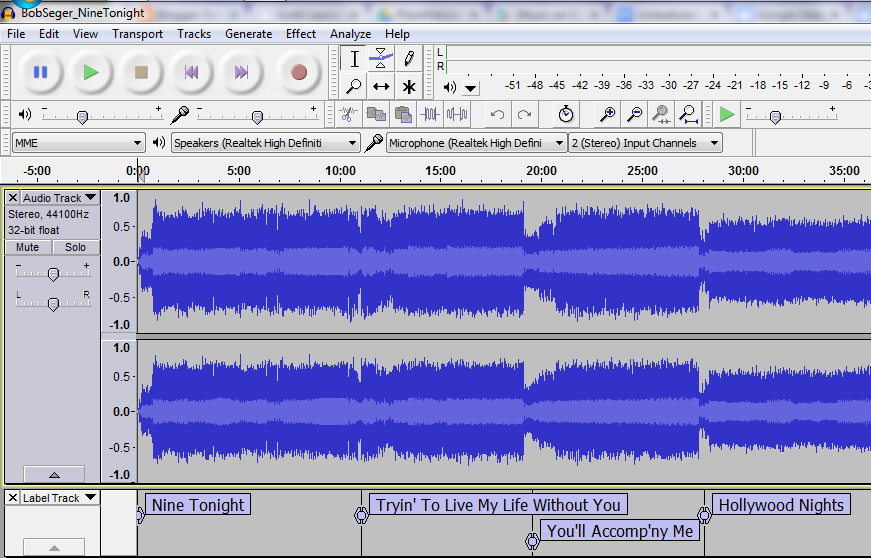
Audacity on Windows - Bob Seger Live Album, "Nine Tonight:
It all boils down to opening a new Audacity file, pressing play on your tape deck and clicking record in Audacity. After the tape is copied into the computer you can then make it ready for its digital life which involves a basic clean up, adding metadata, putting labels at the beginning of each song, and then saving the songs off as a batch. Below I have a list of what I did (on Microsoft Windows) for each tape to go from almost obsolete to all-digital awesome!

  1. Start Audacity and press play on the tape deck. Turn on monitoring in Audacity so you can hear your cassette playing.
  2. Set audio levels to peak just under -6 db so you get all the sound but no distortion.
  3. To do a whole album from tape set the player to auto reverse.
  4. Press play on tape player and then press record in Audacity.
  5. You can listen along or go a do something else until the tape is fully played and recorded.
  6. Save basic metadata of the artist name, album title, year, and genre.
  7. Save your file as a Project (as an AUP file) to allow editing later. Remember to save the project as you go along!
  8. Export the raw audio as a WAV file for an uncompressed backup just in case!
  9. Select a few seconds of 'silence' at the beginning and choose Effect > Noise Removal
  10. Click the Get Noise Sample button in the Noise Removal dialog box. The dialog will close.
  11. Press CTRL + A to select all of the audio.
  12. Choose Effect > Noise Removal, accept the defaults, and click OK.
  13. Wait for the noise to be removed. This will take a few minutes
  14. Press CTRL + A to select all of the audio again.
  15. Click Effect > Normalize, accept the defaults and click OK.
  16. Wait for the audio to be "normalized". This makes the sound as loud as possible so you don;t have to crank your volume when listening to your new digital file. Normalization will also take a few minutes.
  17. Zoom out on timeline and delete and 'silence' you do not want in there. Carefully place you cursor at the beginning of each song, press CTRL + B to add a label.
  18. Type in the name of the track. Repeat for each track. If you don't have the details, Wikipedia is great for getting the exact names of tracks and details your old tape might not have.
  19. Once you have the file the way you want it, choose File > Export Multiple. This will step through your file and create individual MP3 files for each song, titled with your labels. Make sure you create a folder with the name of the artist first and the album under it (which is what iTunes and Google Music likes) to have you music neatly organized.
  20. The final step is to add/upload the folder with your new digital files to your music player like iTunes or Windows Media Player or Google Play.
There can be a lot more you can do and read about, but for me, simply getting a "lost" tape into digital format is perfect. I use Google Play and after upload, I can get in my car, and use my android phone with 3G and Bluetooth connections pulling the music from Google Play I can listen to old "tapes" in my new car. 

And they sound groovy, man!


Monday, December 30, 2013

Talking Glass

Since being selected as a Google Glass Explorer in June, I have had a lot of fun learning about Glass, wearable technology, privacy, modern programming, security, rapid design iteration, and celebrity. Wait . . .  celebrity?!?

Glass gives back what you put in and when I have stepped out, evangelist-like, people's interest and enthusiasm has followed. From a 94-year old acquaintance telling his friends about me and my 'gadget glasses', to random people in public engaging me to ask questions and ask for a try, to the planned out events I have listed below, people are curious, engaged, and excited about the slice of the future which Google Glass displays.

As my journey continues (I get to swap my Glass out for the next version next week!), I can see that more and more people will come to understand that this is about getting technology out of the way so it can truly assist us be more in touch with the world and with those around us. Check out these presentations and interviews about Glass . . . enjoy!

Streaming Media West 2013 - Session C103 - Using Google Glass to Capture and Publish Videos

Interview with Eric Schumacher-Rasmussen, Almost LIVE

Mediasite Webcast - Consumer Video in the Enterprise